Thursday, 21 January 2016

Data Types – Explain Data Type in C++.


A data type determines the type and the operations that can be performed on the data. C++ provides various data types and each data type is represented differently within the computer'smemory. The various data types provided by C++ are built-in data types, derived data types anduser-defined data types as shown in Figure.
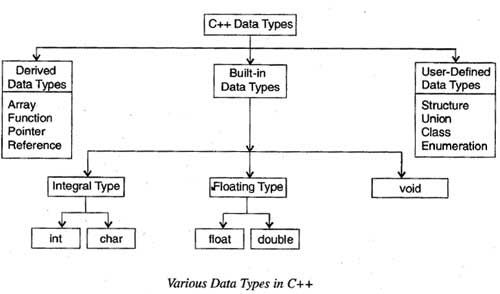
            Various Data Type in C++

Built-In Data Types

The basic (fundamental) data types provided by c++ are integral, floating point and void data type. Among these data types, the integral and floating-point data types can be preceded by several type modifiers. These modifiers (also known as type qualifiers) are the keywords that alter either size or range or both of the data types. The various modifiers are short, long, signed and unsigned. By default the modifier is signed.

In addition to these basic data types, ANSI C++ has introduced two more data types namely, bool and wchar_t.

Integral Data Type: The integral data type is used to store integers and includes char (character) and int (integer) data types.

Char: Characters refer to the alphabet, numbers and other characters (such as {, @, #, etc.) defined in the ASCII character set. In C++, the char data type is also treated as an integer data type as the characters are internally stored as integers that range in value from -128 to 127. The char data type occupies 1 byte of memory (that is, it holds only one character at a time).
The modifiers that can precede char are signed and unsigned. The various character data types with their size and range are listed in Table
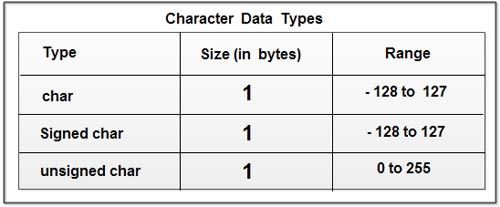
                            Character Data Types
Int: Numbers without the fractional part represent integer data. In C++, the int data type is used to store integers such as 4, 42, 5233, -32, -745. Thus, it cannot store numbers such as 4.28, -62.533. The various integer data types with their size and range are listed in Table
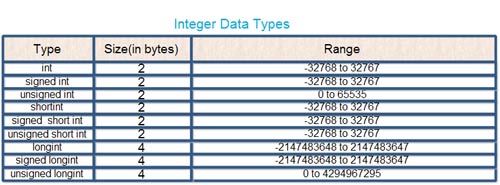
                              Integer Data types
Floating-point Data Type: A floating-point data type is used to store real numbers such as 3 .28, 64. 755765, 8.01, -24.53. This data type includes float and double' data types. The various floating -point data types with their size and range are listed in Table
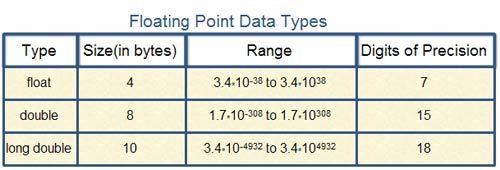
                                 Floating Point Data Types
Void: The void data type is used for specifying an empty parameter list to a function and return type for a function. When void is used to specify an empty parameter list, it indicates that a function does not take any arguments and when it is used as a return type for a function, it indicates that a function does not return any value. For void, no memory is allocated and hence, it cannot store anything. As a result, void cannot be used to declare simple variables, however, it can be used to declare generic pointers.

Bool and wcha_t : The boo1data type can hold only Boolean values, that is; either true or false, where true represents 1 and false represents O. It requires only one bit of storage, however, it is stored as an integer in the memory. Thus, it is also considered as an integral data type. The bool data type is most commonly used for expressing the results of logical operations performed on the data. It is also used as a return type of a function indicating the success or the failure of the function.

In addition to char data type, C++ provides another data type wchar_t which is used to store 16- bit wide characters. Wide characters are used to hold large character sets associated with some non-English languages.

Derived Data Types: Data types that are derived from the built-in data types are known as derived data types. The various derived data types provided by C++ are arrays, junctions, references and pointers.

Array An array is a set of elements of the same data type that are referred to by the same name. All the elements in an array are stored at contiguous (one after another) memory locations and each element is accessed by a unique index or subscript value. The subscript value indicates the position of an element in an array.

Function A function is a self-contained program segment that carries out a specific well-defined task. In C++, every program contains one or more functions which can be invoked from other parts of a program, if required.
Reference A reference is an alternative name for a variable. That is, a reference is an alias for a variable in a program. A variable and its reference can be used interchangeably in a program as both refer to the same memory location. Hence, changes made to any of them (say, a variable) are reflected in the other (on a reference).

Pointer A pointer is a variable that can store the memory address of another variable. Pointers allow to use the memory dynamically. That is, with the help of pointers, memory can be allocated or de-allocated to the variables at run-time, thus, making a program more efficient.

User-Defined Data Types

Various user-defined data types provided by C++ are structures, unions, enumerations and classes.

Structure, Union and Class: Structure and union are the significant features of C language. Structure and union provide a way to group similar or dissimilar data types referred to by a single name. However, C++ has extended the concept of structure and union by incorporating some new features in these data types to support object -oriented programming.
C++ offers a new user-defined data type known as class, which forms the basis of object-oriented programming. A class acts as a template which defines the data and functions that are included in an object of a class. Classes are declared using the keyword class. Once a class has been declared, its object can be easily created.

Enumeration: An enumeration is a set of named integer constants that specify all the permissible values that can be assigned to enumeration variables. These set of permissible values are known as enumerators. For example, consider this statement.
enum country {US, UN, India, China};       // declaring an
                                                                                     //  enum type
In this statement, an enumeration data-type country (country is a tag name) , consisting of enumerators US, UN and so on, is declared. Note that these enumerators represent integer values, so any arithmetic operation can be performed on them.
By default, the first enumerator in the enumeration data type is assigned the value zero. The value of subsequent enumerators is one greater than the value of previous enumerator. Hence, the value of US is 0, value of UN is 1 and so on. However, these default integer values can be overridden by assigning values explicitly to the enumerators
as shown here.
           enum country {US, UN=3, India, china} ;

In this declaration, the value of US is O by default, the value of UN is 3, India is 4 and soon.
Once an enum type is declared, its variables can be declared using this statement.

           country countryl, country2;

These variables countryl, country2 can be assigned any of the values specified in enum declaration only. For example, consider these statements.

                   countryl India; // valid
                   country2 Japan; // invalid

Though the enumerations are treated as integers internally in C++, the compiler issues a warning, if an int value is assigned to an enum type. For example, consider these statements.

                                                       Country1 = 3;                  //warning
                                                       Country1 = UN;              / /valid
                                                       Country1 = (country) 3; / /valid
C++ also allows creating special type of enums known as anonymous enums, that is, enums without using tag name as shown in this statement.
                                                     enum {US, UN=3, India, China};
The enumerators of an anonymous enum can be used directly in the program as shown here.
                                                     int count = US;

The typedef Keyword

C++ provides a typedef feature that allows to define new data type names for existing data types that may be built-in, derived or user-defined data types. Once the new name has been defined, variables can be declared using this new name. For example, consider this declaration.

                                               typedef int integer;

In this declaration, a new name integer is given to the data type into This new name now can be used to declare integer variables as shown here.

                                                 integer i, j, k;

Note that the typedef is used in a program to contribute to the development of a clearer program. Moreover, it also helps in making machine-dependent programs more portable.

Monday, 28 December 2015

initialize strings in C++

Various methods to initialize strings in C++ 

#include <iostream>
#include <string>

using namespace std;

int main()
{
     string s0("welcome to programsplusplus");
     string s1(s0);
     std::cout<<s1;

     string s2(s0,8,3);
     std::cout<<"\n"<<s2;

     string s4("hello world",4);
     std::cout<<"\n"<<s4;

     string s5(10,'x');
     std::cout<<"\n"<<s5;

     string s6(10,42);
     std::cout<<"\n"<<s6;

     string s7(s0.begin(),s0.begin()+5);
     std::cout<<"\n"<<s7;

     return 0;
}
------ OUTPUT------

Please do comment if you don't understand any part or want to know more or just want to say thanks. I love programming and love to teach my friends. Your suggestions and appreciation will make this blog much better.

use of string iterator

// Program to demonstrate the use of string iterator
#include <iostream>
#include <string>

int main()
{
     using namespace std;
     int counter=0;
     string str("welcome to programsplusplus");
     // declares the string iterator
     string::iterator it;
     for (it=str.begin(); it<str.end(); it++)
     {
          // displays each character that the iterator points to
          counter++;
          cout<<" "<<*it;
     }
     cout<<"\n"<<"Total length of the string : "<<counter;

     return 0;
} // end of main
------OUTPUT------


Please do comment if you don't understand any part or want to know more or just want to say thanks. I love programming and love to teach my friends. Your suggestions and appreciation will make this blog much better.

C++ program to demonstrate the concept of Object Oriented Programming Structure(OOPS)

// C++ program to demonstrate the concept of Object Oriented Programming Structure(OOPS)

#include<iostream>

using namespace std;

class MarkSheet
{
     int marks;

     public :

     void setMarks(int marks) // setter function
     {
          this->marks = marks;
     }

     int getMarks() // getter function
     {
          return this->marks;
     }

}; // end of class MarkSheet

int main()
{
     MarkSheet objA; // object A of class MarkSheet
     MarkSheet objB; // object B of class MarkSheet
     int temp;

     // propmts the user to enter the marks of student A
     cout<<" Enter the marks of student A : ";
     cin>>temp;
     objA.setMarks(temp); // uses the setter function to set the marks of student A

     // propmts user to enter the marks of student B
     cout<<" Enter the marks of student B : ";
     cin>>temp;
     objB.setMarks(temp); // uses the setter function to set the marks of student B

     cout<<"\n ---------- Marks of A and B are as follows ------------ \n";
     cout<<" Marks of student A : "<<objA.getMarks(); // displays the marks of student A
     cout<<"\n Marks of student B : "<<objB.getMarks(); // displays the marks of student B
     return 0;
}// end of main


Please do comment if you don't understand any part or want to know more or just want to say thanks. I love programming and love to teach my friends. Your suggestions and appreciation will make this blog much better.

------ OUTPUT ----- 

Basic OOP Program

 Object Oriented Programming or OOP is an approach to programming(in general) that is based on the view of treating each entity or element as an object, in such a way that each object is unaware of the existence of other objects. Before going further, let me lay out some basic details for you.

CLASS -  Many of you must have the definition of class as : "a class is the collection of data members of same or different type, grouped under a common name". Well this is actually a very trivial definition of class. A class serves as a blueprint for building something. Simply put, it is a layout that describes where everything should be put together. In programming
terminology, a class is a way of binding the data describing an entity and its associated functions together.

Now i can go on and on, about classes and object, why the use of classes, data abstraction and so on, but all that you can find in any textbook. Let us jump to the practical implementation of OOP.

The article follows a program that demonstrates the use of classes and objects. Before i get into the nitty gritty of it all, please understand that you need to focus on the concept , not the
technical details. The "TECH DETAILS" will come with time and practice. Focus must be on understanding the concept. So let's begin :

The following program creates a class "MarkSheet" with a single member variable "marks" of type int(a.k.a integer). Now the class also has two PUBLIC member functions, a setter function and a correspondinggetter function. Getter and Setter functions are not some SPECIAL functions, they are just named that way, sort of a trend. The job of a "getter" function is to return
the value of a variable of the class and the job of a "setter" function is to SET the value of a variable of the class.

For e.g : here is a demo setter function

void setDAY(int x) // sets the value of 'day' with the value contained by 'x'
{
     day = x;
}

Similarly, e.g : here is a demo getter function

int getDay() // 'gets' or returns the value of the variable 'day'
{
     return day;
}

The class has the following setter and getter functions :
1 - setMarks() // sets the marks of the student
2 - getMarks() // gets or returns the marks of the student

In the main() function, two objects,name objA and objB are declared that represent object of student A and B respectively. The program then prompts the user to enter the values
of the marks of students A and B. The marks are set by using the setMarks() setter function. After that, the marks are displayed by calling the getMarks() getter function.

Saturday, 15 November 2014

Programme of Function

#include<stdio.h>
#include<conio.h>
void swaping(int *,int *);

main()
{
    int a,b;
    //clrscr();
    printf("Enter value of A and B");
    scanf("%d %d",&a,&b);
    swaping(&a,&b);
    printf("After swapping value of A and B is %d and %d",a,b);
    //getch();


}
void swaping(int *x,int *y)
{
   int temp=0;
   temp=*x;
   *x=*y;
   *y=temp;
}


#include<stdio.h>
#include<conio.h>
void ncr(int ,int );
int fact(int);
main()
{
    int n,r;
    //clrscr();
    printf("Enter value of N and R");
    scanf("%d %d",&n,&r);
    ncr(n,r);

    //getch();


}
void ncr(int x,int y)
{
   float ans;

   ans=fact(x)/(fact(y)*fact(x-y));
   printf("%dC%d is %f",x,y,ans);
}
int fact(int p)
{
    int f=1,i;
    for(i=1;i<=p;i++)
    {
        f=f*i;
    }
    return f;

}


    #include<stdio.h>
    int Fibonacci(int);
     main()
    {
    int n, i = 0, c;
    scanf("%d",&n);
    printf("Fibonacci series\n");
    for ( c = 1 ; c <= n ; c++ )
    {
    printf("%d\n", Fibonacci(i));
    i++;
    }
    return 0;
    }
    int Fibonacci(int n)
    {
    if ( n == 0 )
    return 0;
    else if ( n == 1 )
    return 1;
    else
    return ( Fibonacci(n-1) + Fibonacci(n-2) );
    }


#include<stdio.h>
#include<conio.h>
void maxmin(int [] ,int );

main()
{
    int n,a[20],i;
    //clrscr();
    printf("Enter value size of Array");
    scanf("%d",&n);

    for(i=0;i<n;i++)
    {
        scanf("%d",&a[i]);
    }
    maxmin(a,n);

    //getch();
}
void maxmin(int x[],int n)
{
   int i,max,min;

   max=x[0];
   min=x[0];
   for(i=0;i<n;i++)
   {
       if(max<x[i])
       {
           max=x[i];
       }
       if(min>x[i])
       {
           min =x[i];
       }

   }
   printf("Minimum and Maximum number in given array is %d and %d",max,min);

}


#include<stdio.h>
#include<conio.h>

int fibo(int);
int strlen(char []);
void strrev(char []);
main()
{
    char  s[20],s2[20];

    //clrscr();
    printf("Enter any string ");
    gets(s);
    strrev(s);

    //getch();


}
int strlen(char p[])
{
    int i,length=0;

    for(i=0;p[i] != '\0';i++)
    {

        length++;
    }
    return length;

}
void strrev(char s[])
{
    int length,i,j;
    char revstr[20]="";
    length=strlen(s);
j=0;
    for(i=length-1;i>=0;i--)
    {

        revstr[i]=s[j];
        j++;
    }
printf("Reverse of %s is %s",s,revstr);

}


#include <stdio.h>


int sum (int a);


int main()

{

    int num, result;


    printf("Enter the number: ");

    scanf("%d", &num);

    result = sum(num);

    printf("Sum of digits in %d is %d\n", num, result);

    return 0;

}


int sum (int num)

{
    int x;
    if (num == 0)

    {
        x=0;
       return x;

    }

    else

    {

        x=num % 10 + sum (num / 10);

       return x;

    }

}

Wednesday, 15 October 2014

Character Array Basic Introduction

What are Strings
The way a group of integers can be stored in an integer array, similarly a group of characters can be stored in a character array. Character arrays are many a time also called strings. Many languages internally treat strings as character arrays, but somehow conceal this fact from the programmer. Character arrays or strings are used by programming languages to manipulate text such as words and sentences. A string constant is a one-dimensional array of characters terminated by a null ( ‘\0’ ). For example, char name[ ] = { 'H', 'A', 'E', 'S', 'L', 'E', 'R', '\0' } ; Each character in the array occupies one byte of memory and the last character is always ‘\0’. What character is this? It looks like two characters, but it is actually only one character, with the \ indicating that what follows it is something special. ‘\0’ is called null character. Note that ‘\0’ and ‘0’ are not same. ASCII value of ‘\0’ is 0, whereas ASCII value of ‘0’ is 48. Figure shows the way a character array is stored in memory. Note that the elements of the character array are stored in contiguous memory locations. The terminating null (‘\0’) is important, because it is the only way the functions that work with a string can know where the string ends. In fact, a string not terminated by a ‘\0’ is not really a string, but merely a collection of characters. 

C concedes the fact that you would use strings very often and hence provides a shortcut for initializing strings. For example, the string used above can also be initialized as, char name[ ] = "HAESLER" ; Note that, in this declaration ‘\0’ is not necessary. C inserts the null character automatically.